Fate
Co-op FPS with roguelike and hero shooter elements.
A multiplayer first person shooter with roguelike and hero shooter elements.
- Networked FPS and TPS person animation implementation for three heroes with shared rig, enemies and VFX integration
- General purpose game-feel components for Viewmodel rendering and Camera modifiers (Shake, Bob, etc.)
- Rain and wet-surface rendering in a custom UE5 fork, including a Lumen shading model fix
- Research and Spec DLSS integration for improved performance and upscaling
Key LessonPrototype multiplayer scope early. Networking forced a redesign mid-project that better planning would have avoided.
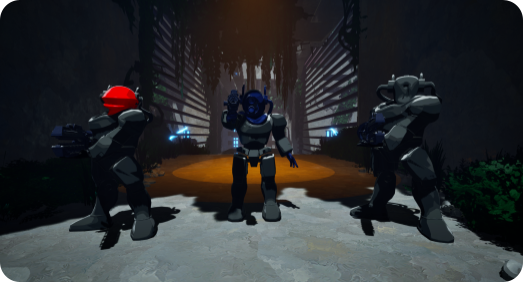
Fate is a 2-3 player first person shooter with roguelike and hero shooter elements, built in a fork of Unreal Engine 5.7. Players pick one of three heroes, drop into a raid, fight through enemies and puzzles, upgrade their weapons with enchants, and take down a boss. It was made by a team of ten over seven weeks.
An unconventional role
A lot of our designers had real Unreal experience and a genuine interest in technical implementation, which left us with an unusually large implementation workforce. Instead of forcing everyone back into their disciplines we leaned into it and worked in a flexible, interdisciplinary way. That gave me the luxury of picking a narrow focus, so I spent the project on technical animation and tech art rather than core gameplay.
What I owned
- Networked character animation: every hero visible in first person to its owner and in third person to everyone else
- First person game feel: viewmodel sway, bobbing and aim-down-sights
- Rain and wet-surface rendering, including the engine-side fix that made it possible
- DLSS research and the settings spec for it
The game leans on this kind of work heavily. Taking it on let the rest of the team stay focused on their own areas without spreading themselves thin just to get animations or game feel across the line. My work did not touch core gameplay much, but it is a big part of why the game reads as polished.
This was one of my two largest pieces of work. Three heroes, each needing first and third person animations, all of it networked and all of it tied closely to gameplay. I worked alongside our animator and designers throughout to land on what actually worked.
Third person: one shared Animation Blueprint
The third person rig is driven by a single Animation Blueprint shared across all heroes:
- A locomotion blendspace and an aim offset blendspace are layered additively, so movement and aim direction stay mostly independent
- The aim offset lets a player look around naturally instead of rotating a static pose, which is something a lot of games skip
- Hero-specific values, like which aim offset to use, are resolved at runtime from a HeroDefinition data asset
- The lower body pose is cached and reused through a LayeredBlendPerBone node, so stepping animations only play beneath a certain bone and never fight the aim pose
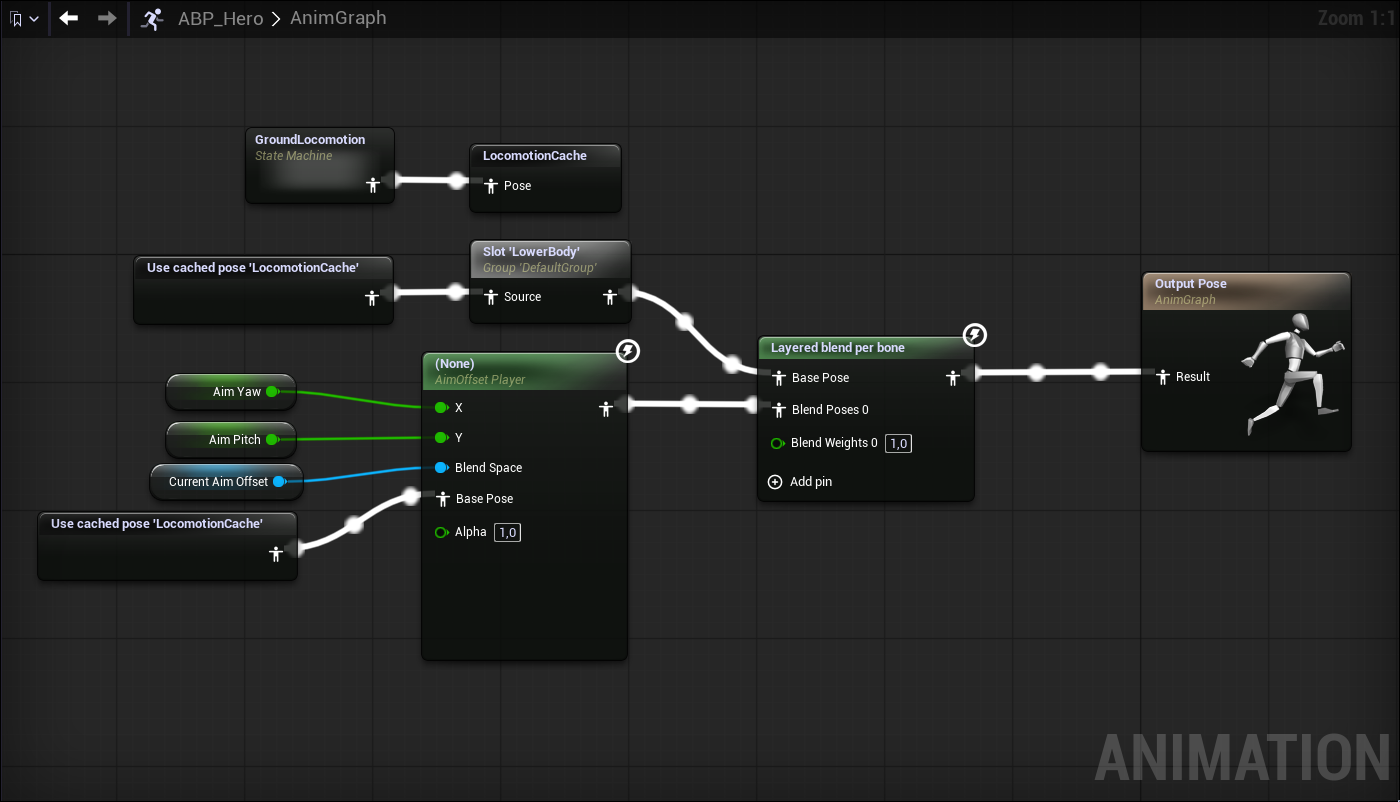
Because networking means the player actor can exist before its hero is assigned, the ABP polls for a valid HeroDefinition before reading anything from it. Once a valid hero is set, the rest of the graph switches on it.
Turn stepping, replicated in AngelScript
The stepping itself is decided and replicated in AngelScript, which I much preferred to Blueprints and C++ for this kind of work. The server checks how far a player has turned their view, and once it crosses a threshold it rotates the character and sets a replicated stepping direction that every client then animates.
// Replicates the control rotation for use in client-side player model rotation and stepping logic.
UFUNCTION(NotBlueprintCallable)
void ReplicatePlayerModel()
{
    if (!HasAuthority())
        return;

    ReplicatedControlRotation = GetControlRotation();

    float YawDelta = FRotator::GetDelta(CharacterModelRotation, ReplicatedControlRotation).Yaw;
    float CurrentStepInterval = PondCharMoveComp.ResolveMovementState() == EPondMovementState::Still ?
                                PlayermodelIdleStepInterval :
                                PlayermodelMovingStepInterval;

    // If the yaw delta since last step is greater than the step interval, snap to the next step.
    // Also set the stepping direction for animation blueprint logic.
    if (Math::Abs(YawDelta) > CurrentStepInterval)
    {
        SteppedYaw = ReplicatedControlRotation.Yaw;
        Stepping = int(Math::Sign(YawDelta));
    }

    CharacterModelTargetRotation = FRotator(Pitch = 0, Yaw = SteppedYaw, Roll = 0);

    // Reset stepping state if we've nearly reached the target rotation.
    float StepDelta = FRotator::GetDelta(CharacterModelRotation, CharacterModelTargetRotation).Yaw;
    if (Math::IsNearlyZero(StepDelta, ErrorTolerance = 40.f))
    {
        Stepping = 0;
    }
}
First person game feel
On the first person side I built the feel by hand rather than with keyframes, which keeps it responsive and cheap to tune:
- Viewmodel sway when looking around
- Procedural bobbing while moving
- Aim-down-sights centering that adjusts tilt based on movement
My other major piece was rain, which our level designer wanted for atmosphere. It turned into a much deeper rabbit hole than I expected, in the best way.
Fixing reflections first
Before any of it could work I had to fix a rendering problem. Another programmer had added a custom celshading model into the engine source, but it did not integrate correctly with the G-Buffer BxDF sampling. Lumen reflections had no idea how to handle those surfaces and roughness did nothing at all. Without working reflections, nothing would read as wet.
The shading model wrote its ID into the buffer correctly, but that ID was never handled in the common sampling code Lumen reads from. I added a case for it that falls back to default lit sampling, since our model is close enough apart from the banded lighting and specular.
FBxDFSample SampleBxDF(const uint TermMask, FGBufferData GBuffer, float3 V, float4 E)
{
    switch( GBuffer.ShadingModelID )
    {
        case SHADINGMODELID_DEFAULT_LIT:
        case SHADINGMODELID_SINGLELAYERWATER:
        case SHADINGMODELID_SUBSURFACE:
        case SHADINGMODELID_SUBSURFACE_PROFILE:
        case SHADINGMODELID_PREINTEGRATED_SKIN:
        case SHADINGMODELID_CLEAR_COAT:
        case SHADINGMODELID_TWOSIDED_FOLIAGE:
        case SHADINGMODELID_CLOTH:
        case SHADINGMODELID_EYE:
        case SHADINGMODELID_CELSHADING:
            return SampleDefaultLitBxDF(TermMask, GBuffer, V, E);
        case SHADINGMODELID_HAIR:
            return SampleHairBxDF(TermMask, GBuffer, V, E);
        default:
            return (FBxDFSample)0;
    }
}
Three layers of wetness
With reflections working, the rain surface comes down to three layers:
- Puddles sample a noise texture by world position and use it as roughness, so wetness settles unevenly across surfaces
- Ripples are a material function where each pixel runs its own ripple lifecycle from time plus a per-pixel phase offset, appearing as an expanding ring on flat surfaces only. Two of these are layered with offset speed and timing so the pattern never looks uniform
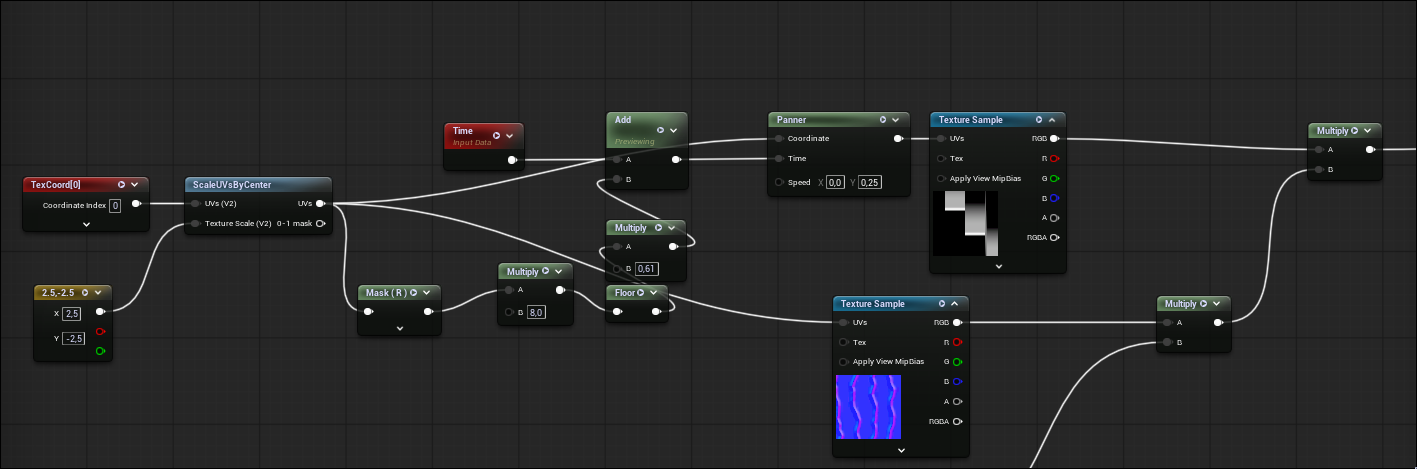
- Dripping on walls uses eight independent vertical columns scrolling downward, each offset in time so they never sync up
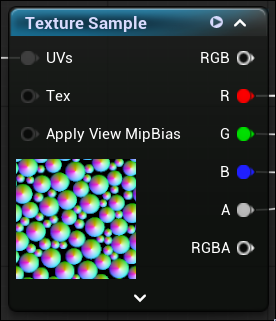
The ripple shapes and positions are driven by this texture. The alpha channel supplies the per-pixel phase offset, so every ripple runs on its own timer.
For the drips, a mask shapes where streaks land, a normal map perturbs the surface, and a wetness weight blends it into the base material. The result is reflections of the world distorting as droplets run down the walls.
Masking and falling rain
Ripples and dripping are masked by surface normals, so ripples only land on floors and drips only on walls, with a margin so gradual inclines do not look dry. The falling rain itself is a Niagara GPU particle sim that collides against the voxelized SDF of the world, which keeps rain out of indoor spaces at a fraction of the cost of real collision.
Towards the end of the project I pushed to integrate DLSS. I will be honest, my main reason was using it as a crutch. A lot of heavy rendering features landed in the last week and I was worried about performance, which I have seen sink plenty of UE5 games. I wanted the game presentable for Jury Day and to buy us time before committing to premature optimization.
Why it helped beyond performance
It turned out to be a real visual upgrade too. UE5 leans on TSR by default, and a lot of its rendering, like Lumen's temporal instability, is built around TSR masking it. DLSS drops in as a replacement cleanly and gives better fidelity at lower resolution scales, with much stronger anti-aliasing, especially running DLAA at full resolution.
The integration
- Integrated the Nvidia DLSS and Streamline plugins into our engine fork
- Chose two model presets: a legacy convolutional model for older RTX cards and a transformer model for newer ones, each balanced for fidelity and performance
- Wrote a spec for the designer building the settings menu, listing the CVars and functions to wire in
Since my work sat across animation, rendering and game feel rather than core gameplay, I held to three principles. All of it had to survive the major refactors our core codebase went through, so staying decoupled was not optional.
- Reusability: systems that work for any hero, not one
- No hard coupling: nothing that breaks when character code changes
- Ease of use: other people had to build on my systems without help
Composition over inheritance
The first person viewmodel is a good example. Stripped down, a viewmodel is just a skeletal mesh, so I derived from SkeletalMeshComponent and added sway, ADS and the rest on top. Supporting a new hero then becomes dropping in a viewmodel component and setting its mesh and animation blueprint, with no coupling to character code and a few public functions to trigger behaviour.
Making it easy for others
When a designer wanted the camera to shake on the boss's ground slam, I did not want him wiring up player references and boilerplate. I exposed a static PlayCameraShake() callable from both script and Blueprints that runs locally per client. He only had to call it in a code path that runs on each player, which our use of GAS GameplayCues made trivial.
One rig for all heroes
Early on, our animator and I agreed to build all three heroes on a shared rig and animation system. That let him reuse one base model and animation set and only create new content where a hero genuinely needed it, and it saved me a lot of duplicated logic. I just wish we had committed to it sooner.
Scoping
The thing I would change most is scoping. We started large and underestimated the work, and the biggest blind spot was multiplayer. As a single player game the original plan would have been fine, but networking complexity eventually forced a pivot after alpha where we cut procedural generation, since it would not integrate cleanly with the multiplayer subsystem. That cascaded into redesigning much of the game, including the character classes I was animating.
My own overscope was animation parity: wanting nearly everything a player does to be visible in both first and third person. That got trimmed, and the right call would have been to prototype and iterate earlier rather than guessing.
What I would build next time
A networked helper for tying gameplay logic to animation events. The boss had moments like a ground slam windup and impact, or a laser that tracks the arm, where animations play on all clients but the logic on montage notifies has to run server-side only. We fought UE's built-in montage nodes more than we should have. A small library letting designers attach delegates to animation events would have saved both of us a lot of friction.
Overall
Those caveats aside, this is the project I am proudest of. The interdisciplinary collaboration made a real difference, and getting to bridge programming and art while working closely with talented artists produced something well past what I expected from a game project. I would happily do it again.